Thursday, May 19, 2016

7 Outrageous Examples of Police Spying and Harrassment Toward Peaceful Activists | Alternet

7 Outrageous Examples of Police Spying and Harrassment Toward Peaceful Activists | Alternet


7 Outrageous Examples of Police Spying and Harrassment Toward Peaceful Activists

According to a new report by the American Civil Liberties Union (ACLU), law enforcement agencies around the country have acted as diligent Thought Police, relying on dubious justifications to spy on Americans based on little more than their political beliefs (PDF).  

The report notes our nation's rich tradition "of spying on American citizens and infiltrating or otherwise obstructing political activist groups." After Cold War initiatives like the FBI's COINTELPRO and the CIA's Operation Chaos came to light, federal agencies enacted new rules against spying on people for their politics. But in 2002, then-Attorney General John Ashcroft, leaning heavily on the attacks of 9/11, suspended those restrictions, saying, "We in the leadership of the FBI and the Department of Justice began a concerted effort to free the field agents—the brave men and women on the front lines—from the bureaucratic, organizational and operational restrictions and structures that hindered them from doing their jobs effectively." 

Right-wingers like Ashcroft have always cited external threats to crack down on internal dissent. Those concerted efforts paid off in a cultural shift across the law enforcement community. As journalist Matthew Rothschild noted, "Equating protesters with terrorists is not confined to FBI headquarters." Rothschild quoted Mike Van Winkle, a spokesman for the California Anti-Terrorism Information Center, who explained the surveillance of peaceful protesters opposed to the war in Iraq like this: "if you have a protest group protesting a war where the cause that's being fought against is international terrorism, you might have terrorism at that protest. You can almost argue that a protest against that is a terrorist act." 

With that attitude infecting the nation's law enforcement agencies, the ACLU report tells us, "these old tendencies have once again come to the fore. Law enforcement agencies across America continue to monitor and harass groups and individuals for doing little more than peacefully exercising their First Amendment rights."  

The report adds that Americans, "have been put under surveillance … just for deciding to organize, march, protest, espouse unusual viewpoints, and engage in normal, innocuous behaviors such as writing notes or taking photographs in public." Some of those "suspicious activities" are almost laughable, at least until you consider how dangerous the precedent is.  

Here are seven of the most ridiculous ways law enforcement has "protected" us by spying on or otherwise harassing law-abiding Americans. 

1. Los Angeles Arts Police 

A special order issued in early 2008 by the Los Angeles Police Department mandated that all officers report people engaging in a list of 65 supposedly suspicious behaviors. According to the ACLU report, "the list includes such innocuous, clearly subjective, and First Amendment-protected activities as, taking measurements, using binoculars … drawing diagrams, taking notes, and espousing extremist views." But the best one was taking pictures or video footage "with no apparent esthetic value." Angelenos can rest easy knowing the esthetics cops are on the case. (But beware, Hollywood: not all that stuff you folks put out is likely to make the cut.)

2. You Never Know What A Terrorist Can Do With a Piece of Tofu 

In late 2004, a lecturer who once worked for People for the Ethical Treatment of Animals (PETA) gave a lecture on the "benefits of a vegan diet" at Cal State, Fresno. There were 60 people in attendance. According to the ACLU, 10 percent of them were undercover police officers and county sheriff's deputies.  

3. Bagging Groceries Could Lead to Violent Extremism

In 2003 and 2004, a series of strikes against California supermarkets drew national attention. When a delegation of "religious leaders planned a pilgrimage to the Safeway CEO's home to deliver postcards supporting the striking workers," it also drew the attention of law enforcement. Sheriff's deputies from Contra Costa County Sheriff's Homeland Security Unit went to the United Food and Commercial Workers Union (UFCW), and, according to the ACLU, "staff directed them to a contact number on a flyer. Despite the fact that the sheriff's department had been in contact with the pilgrimage organizers-union leaders saw the same sheriff's deputies in plainclothes attending a demonstration at a Safeway store in San Francisco." 

4. Saying Mean Things About Politicians on a Blog: a 'Potential Threat'

In Connecticut, activist Ken Krayeske isn't terribly fond of the policies of Governor Jodi Rell. According to the ACLU report, Connecticut state police "monitored Krayeske's blog" and "sent local police his photograph as a potential threat to the Governor." When Krayeske took a photograph of Rell at a public event, he was promptly arrested by Hartford cops. 

5. Forget Islamic Extremism -- Quaker Terror Cells Are Hidden Among Us! 

When it was discovered that military intelligence had been spying on Americans who opposed the wars in Iraq and Afghanistan, a local Fort Lauderdale reporter called Peter Ackerman to ask if he was, indeed, a "credible threat," as he'd been designated on a government watch list. Ackerman, who like all Quakers believes in non-violence, was surprised to learn he'd earned a spot on the list for distributing leaflets with "information about conscientious objection to recruiters and interested civilians" at local air shows in 2004 and 2005.

6. A Piece of Tofu Is One Thing, but an Extremist Armed With a Chunk of Tempeh … 

In Georgia, the Department of Homeland Security is also worried about the vegan/vegetarian threat (an axis of evil that presumably includes ovo-lacto vegetarians). According to the ACLU, "Caitlin Childs was arrested after a peaceful protest on public property outside the Honey Baked Ham store on Buford Highway in DeKalb County for taking down the license plate number of the car belonging to the DHS agent who had been photographing the protesters all day."

People who eschew meat are a wily bunch, but our security agencies are hard on the case. Before the 2008 Republican National Convention in Minnesota, "the FBI Joint Terrorism Task Force attempted to recruit a University of Minnesota student arrested for vandalism to go undercover at 'vegan potlucks' in order to spy on groups organizing protests." 

7. Cops in Maryland Believe Almost Anyone Is a Potential Threat 

The Maryland State Police spied on more than 30 activist groups, "mostly peace groups and anti-death penalty advocates, and wrongly identified 53 individual activists and about two dozen organizations as terrorists." As if that weren't enough, they distributed the "information" to a whole slew of law enforcement agencies, including "the Baltimore City Police Department, the Baltimore County Police Department, the Anne Arundel County Police Department, the Washington-Baltimore High Intensity Drug Trafficking Area Task Force, a local police representative of the FBI's Joint Terrorism Task Force, a National Security Agency security official, an unnamed military intelligence officer, and DHS."  

Those are your tax dollars at work. But don't feel remorseful. As George W. Bush reminded America on his way out of the White House, we haven't suffered a terror attack since 9/11 -- neither the meaty nor the vegetarian variety.

This article was edited after publication.


^ed 

About Direct Messages | Twitter Help Center

About Direct Messages | Twitter Help Center

About Direct Messages

Direct Messages are the private side of Twitter. You can use Direct Messages to have private conversations with Twitter users about Tweets and other content.

The basics

  • You can start a private conversation or create a group conversation with anyone who follows you.
  • Anyone in a conversation can send Direct Messages to the group. Everyone in a group can see all messages, even if everyone doesn't follow each other.
  • In group conversations, anyone in the conversation can add other participants. Newly added participants won't see the prior history of the conversation.
  • Some accounts, particularly businesses on Twitter, have enabled a setting to receive Direct Messages from anyone. You can send a Direct Message to these users even if they don't follow you.
  • In both group and one-on-one conversations, you cannot be in a conversation with someone you block.

To send a Direct Message from your Twitter app:

  1. Tap the envelope icon. You'll be directed to your Messages.
  2. Tap the new Message icon  to create a new Message.
  3. In the address box, enter the name(s) or @username(s) of the users you wish to send a Message to. A group Message can include up to 50 people.
  4. Enter your message.
  5. In addition to text, you can include a photo, video, GIF, or send an emoji via Direct Message.
    • Tap the camera icon  to take a photo or record a video, or attach one from your device gallery. 
    • To include an animated GIF in your message, tap the GIF icon  to search for and select a file from the media library.
    • To send an emoji, tap the emoji iconbefore typing your message. Select an emoji from a preselected set, and your message will immediately send. When you send one emoji, it displays in a bigger size than when you send multiple emojis at once.
  6. Tap Send.
  7. You and anyone else in a conversation can click or tap the more icon(iOS) or overflow icon  (Android) to add new people to the group, view everyone participating in the group, edit the name of the group, turn off notifications for the conversation, or delete the conversation. 

To delete a Direct Message or conversation:

  • To delete a Direct Message, tap and hold the message and select Delete from the menu that pops up.
  • To delete an entire conversation, swipe left on the conversation and tap the trash can icon (iOS) or tap and hold the conversation and select Delete (Android). You can also delete an entire conversation by clicking or tapping the more icon(iOS) or overflow icon  (Android) and selecting Delete from the menu that pops up.
  • When you delete a Direct Message or conversation (sent or received), it is deleted from your account only. Others in the conversation will still be able to see Direct Messages or conversations that you have deleted.

To send a Direct Message via the web:

  1. Log in to your Twitter account.
  2. Click Messages in the top navigation bar.
  3. You'll see a pop up showing your Direct Message history. Click the New message button.
  4. In the address box, enter the name(s) or @username(s) of the users you wish to send a Message to. A group Message can include up to 50 people.
  5. In addition to text, you can include a photo, video, GIF, or send an emoji via Direct Message.
    • Click the camera icon to upload a photo or video.
    • To include an animated GIF in your message, tap the GIF icon  to search for and select a file from the media library.
    • Click the emoji iconto select an emoji from a preselected set to include in your message.
  6. Click the Send button or press the enter key to send.
  7. You and anyone else in a conversation can click the More iconto add new people to the group, view everyone participating in the group, edit the name of the group, turn off notifications for the conversation, or delete the conversation.

Note: To start a new line in a message, press the shift and enter keys at the same time. Pressing only the enter key will send your message.

To delete a Direct Message or conversation:

  • To delete a Direct Message, hover your mouse over the message and click the trash can icon  that appears. Then click Delete message to confirm.
  • To delete an entire conversation, locate the conversation and click to open it. Then click the more iconand select Delete Conversation. Then click Yes to confirm.
  • When you delete a Direct Message or conversation (sent or received), it is deleted from your account only. Others in the conversation will still be able to see Direct Messages or conversations that you have deleted.

To Share a Tweet via Direct Message

Sharing a Tweet via Direct Message is a great way to spark a conversation with a group of friends. Learn more here.

To receive Direct Messages from anyone:

You can receive Messages from anyone if you check the box next to Receive Direct Messages from anyone in your Security and privacy settings on twitter.com. You can also adjust this setting via the Twitter for iOS or Twitter for Android apps.

Note: If you enable this option, any user can add you to group conversations.

To change your settings using Twitter for iOS:

  1. From the Me tab, tap the gear icon 
  2. Select Settings.
  3. Tap Privacy and content.
  4. Under Privacy, and next to Receive Direct Messages from anyone, slide the switch to allow anyone to send you Messages.

To change your settings using Twitter for Android:

  1. In the top menu, tap on the overflow icon 
  2. Select Settings.
  3. Tap Privacy and content.
  4. Next to Receive messages from anyone, check the box to allow anyone to send you Direct Messages.

To send and receive Direct Messages on your phone via SMS:

If your Twitter account is connected to your mobile phone, you can send and receive Direct Messages via SMS.

  • Haven't added your mobile phone yet? Find out how here.
  • Added your mobile phone already? Find out what text commands to use to send Direct Messages via SMS.
  • Read this article about setting up your mobile preferences to learn more about how to receive Direct Messages via SMS.

A note about Direct Message failures: Please be careful to ensure that Direct Messages you send via SMS are under 160 characters, including the d command and username. Your service provider may split SMS messages greater than 160 characters into multiple SMS messages. In this case, the second and any subsequent SMS messages will post as  public Tweets because they don't begin with the appropriate text command (d username) that tells Twitter they are Direct Messages, as the first SMS message did.

Frequently asked questions:

My account is protected. What happens when I enable the "Receive Direct Messages from anyone" option?

Regardless of your Tweet privacy settings (i.e. whether your Tweets are protected or not protected), your account will be able to receive Direct Messages from anyone if you enable the option to Receive Direct Messages from anyone.

What happens when I share a link in a Direct Message?

When you share a link in a Direct Message, it is automatically processed and shortened to a t.co link. You can learn more about link shortening here. Please note that anyone with a t.co shortened link will be able to navigate to the destination URL.

Who can see media I share in a Direct Message?

When you share media in a Direct Message, it will be viewable by everyone in the conversation. Please note that recipients may download or re-share links to media that you share in a Direct Message. Anyone with the link to a video or GIF shared in a Direct Message will be able to view the content.

Why am I not seeing group Messages?

You can start and participate in group Messages when using twitter.com, the Twitter for iPhone, iPad or Android apps, and TweetDeck.

What happens when I delete a Message or conversation?

  • When you delete a Direct Message or conversation (sent or received), it is deleted from your account only. Others in the conversation will still be able to see Direct Messages or conversations that you have deleted.
  • When you delete a group conversation, you will leave that group and will no longer be able to participate.

How can I stop someone from sending me Direct Messages?

To stop receiving Direct Messages from someone, locate the conversation with that user and click to open it. Click the more iconand select Flag as spam or Mark as abusive. Then click to confirm. This user will not be able to send you a Message until you send them a Message first.

You can also choose to block the user. Blocked users will not be able to send you Messages until you unblock them.

Why am I not seeing a reply box?

You will not see a reply box if you are not able to send a Direct Message to the other participant. This might happen if the other participant has unfollowed you, blocked you or has flagged the conversation with you.

Why am I having trouble sending Direct Messages?

There is an account limit of 1,000 Direct Messages sent per day. Once you reach this limit, you can't send any more Direct Messages for the day.

If you are sending Direct Messages to accounts that do not follow you, you may need to verify your phone number.

If you are sending duplicate Direct Messages to multiple accounts (including sending the same link to multiple accounts), this may be flagged as spam activity and can result in you not being able to send a Direct Message for a short time. You may need to wait at least 30 minutes without any attempt at sending a Direct Message before you'll be able to do so again.

My account is sending Messages without my knowledge. What is going on?

If your account is sending a Direct Message without your knowledge, it may be compromised. Follow the steps outlined in this article to help secure it.

Why am I receiving Messages from myself?

Please take the following actions:

  1. While signed in, visit your Apps tab in settings. Revoke access for any third party application that you don't recognize.
  2. If you're still experiencing this problem after you've revoked unwanted applications, or if you weren't expecting this behavior when you approved this connection, please contact us.


^ed 

Make a Disaster Plan for Your Pets : The Humane Society of the United States

Make a Disaster Plan for Your Pets : The Humane Society of the United States
YES!! Emergency Plan for Spotty 


START GETTING READY NOW

ID your pet

Make sure that cats and dogs are wearing collars and identification tags that are up to date. You'll increase your chances of being reunited with pets who get lost by having them microchipped; make sure the microchip registration is in your name. But remember: The average citizen who finds your pet won't be able to scan for a chip, but they will probably be able to read a basic tag!

Put your cell phone number on your pet's tag. It may also be a good idea to include the phone number of a friend or relative outside your immediate area—in case you have had to evacuate.

Put together your disaster kit

Use our checklist to assemble an emergency kit for yourself and your pet.

Find a safe place to stay ahead of time

Never assume that you will be allowed to bring your pet to an emergency shelter. Before a disaster hits, call your local office of emergency management to see if you will be allowed to evacuate with your pets and verify that there will be shelters in your area that take people and their pets.

Contact hotels and motels outside your immediate area to find out if they accept pets. Ask about any restrictions on number, size and species. Inquire if a "no pet" policy would be waived in an emergency. Keep a list of animal-friendly places handy, and call ahead for a reservation as soon as you think you might have to leave your home.

For help identifying pet-friendly lodgings, check out these websites:

Make arrangements with friends or relatives. Ask people outside your immediate area if they would be able to shelter you and your pets—or just your pets—if necessary. If you have more than one pet, you may need to arrange to house them at separate locations.

Consider a kennel or veterinarian's office. Make a list of boarding facilities and veterinary offices that might be able to shelter animals in disaster emergencies (make sure to include their 24-hour telephone numbers).

Check with your local animal shelter. Some shelters may be able to provide foster care or shelter for pets in an emergency. But keep in mind that shelters have limited resources and are likely to be stretched during a local emergency.

Plan for your pet in case you're not home

In case you're away during a disaster or evacuation order, make arrangements well in advance for someone you trust to take your pets and meet you at a specified location. Be sure the person is comfortable with your pets and your pets are familiar with them. Give your emergency caretaker a key to your home and show them where your pets are likely to be (especially if they hide when they're nervous) and where your disaster supplies are kept.

If you have a pet-sitter, they may be able to help. Discuss the possibility well in advance.

If you evacuate, take your pet

Rule number one: If it isn't safe for you, it isn't safe for your pets. You have no way of knowing how long you'll be kept out of the area, and you may not be able—or allowed—to go back for your pets. Pets left behind in a disaster can easily be injured, lost or killed.
Pledge to take your pet with you when disaster strikes.

Rule number two: Evacuate early. Don't wait for a mandatory evacuation order. Some people who have waited to be evacuated by emergency officials have been told to leave their pets behind. The smell of smoke or the sound of high winds or thunder may make your pet more fearful and difficult to load into a crate or carrier. Evacuating before conditions become severe will keep everyone safer and make the process less stressful.

If you stay home, do it safely

If your family and pets must wait out a storm or other disaster at home, identify a safe area of your home where you can all stay together.

  • Close off or eliminate unsafe nooks and crannies where frightened cats may try to hide.
  • Move dangerous items such as tools or toxic products that have been stored in the area.
  • Bring your pets indoors as soon as local authorities say trouble is on the way. Keep dogs on leashes and cats in carriers, and make sure they are wearing identification.
  • If you have a room you can designate as a "safe room," put your emergency supplies in that room in advance, including your pet's crate and supplies. Have any medications and a supply of pet food and water inside watertight containers, along with your other emergency supplies. If there is an open fireplace, vent, pet door or similar opening in the house, close it off with plastic sheeting and strong tape.
  • Listen to the radio periodically, and don't come out until you know it's safe.

After the disaster

Your home may be a very different place after the emergency is over, and it may be hard for your pets to adjust.

  • Don't allow your pets to roam loose. Familiar landmarks and smells might be gone, and your pet will probably be disoriented. Pets can easily get lost in such situations.
  • While you assess the damage, keep dogs on leashes and cats in carriers inside the house. If your house is damaged, your pets could escape.
  • Be patient with your pets after a disaster. Try to get them back into their normal routines as soon as possible. Be ready for behavioral problems caused by the stress of the situation. If these problems persist, or if your pet seems to be having any health problems, talk to your veterinarian.
  • If your community has been flooded, check your home and yard for wild animals who may have sought refuge there. Wildlife can pose a threat to you and your pet. Check out our tips for humanely evicting wildlife.

Be ready for everyday emergencies

You can't get home to your pet

There may be times that you can't get home to take care of your pets. Icy roads may trap you at the office overnight, an accident may send you to the hospital—things happen. But you can make sure your pets get the care they need by making arrangements now:

  • Find a trusted neighbor, friend or family member and give him or her a key. Make sure this backup caretaker is comfortable and familiar with your pets (and vice versa).
  • Make sure your backup caretaker knows your pets' feeding and medication schedule, whereabouts and habits.
  • If you use a pet-sitting service, find out in advance if they will be able to help in case of an emergency.

Heat wave

High temperatures can be dangerous. Learn more about hot weather safety for pets.

The electricity goes out

If you're forced to leave your home because you've lost electricity, take your pets with you to a pet-friendly hotel. If it's summer, even just an hour or two in the sweltering heat can be dangerous. If you stay at home during a summer power outage, ask your local emergency management office if there are pet-friendly cooling centers in the area.

If it's winter, don't be fooled by your pets' fur coats; it isn't safe to leave them in an unheated house.

Disaster plans aren't only essential for the safety of pets. If you're responsible for other kinds of animals during natural disasters, disaster plans for feral or outdoor cats, horses and animals on farms can be lifesavers.


^ed 

Credit Card Breach at America’s Thrift Stores — Krebs on Security

Credit Card Breach at America's Thrift Stores — Krebs on Security

Credit Card Breach at America's Thrift Stores

Another charity store chain has been hacked: America's Thrift Stores, an organization that operates donations-based thrift stores throughout the southeast United States, said this week that it recently learned it was the victim of a malware-driven security breach that targeted software used by a third-party service provider.

americasthrift"This breach allowed criminals from Eastern Europe unauthorized access to some payment card numbers," the company's CEO said in a statement. "This virus/malware, is one of several infecting retailers across North America."

The statement continues:

"The U.S. Secret Service tells us that only card numbers and expiration dates were stolen. They do not believe any customer names, phone numbers, addresses or email addresses were compromised. This breach may have affected sales transactions between September 1, 2015 and September 27, 2015. If you used your credit or debit card during this time to purchase an item at any America's Thrift Store location, the payment card number information on your card may have been compromised."

Nevertheless, several banking sources say they have seen a pattern of fraud on cards all used at America's Thrift Stores locations indicating that thieves have been able to use the data stolen from the compromised point-of-sale devices to counterfeit new cards.

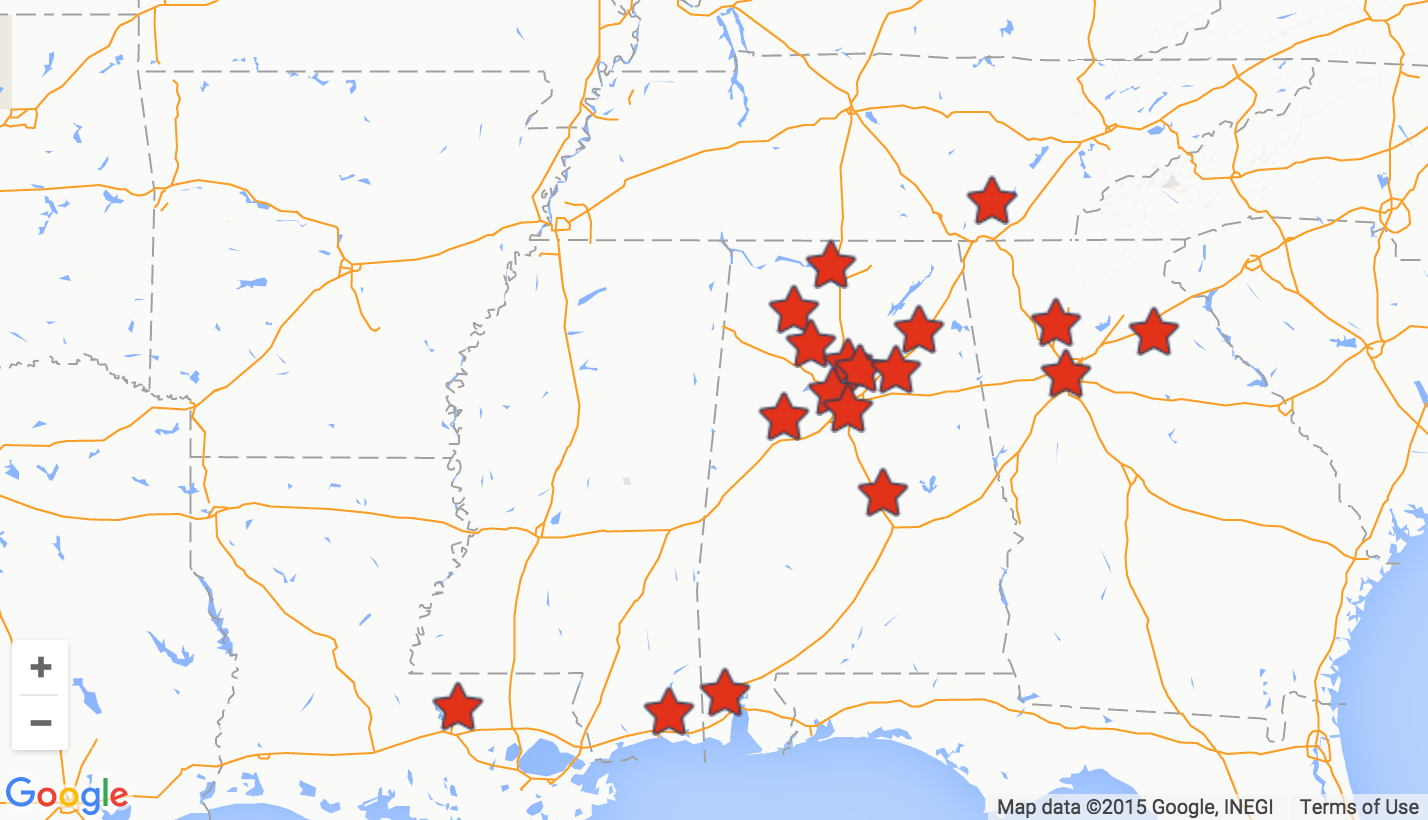
Founded in 1984, America's Thrift Stores is a for-profit thrift store and operates in the southeastern United States. The company is headquartered in Birmingham, Alabama and operates stores in Alabama, Georgia, Tennessee, Mississippi and Louisiana. According to the company's site, the organization employs over 1,000 employees and pays over $4 million to its non- profit partners annually, as it turns donated items into revenue for their missions.

The breach involving America's Thrift Stores comes on the heels of a similar incident at Goodwill last year. That incident was tied back to security weaknesses at third-party payment vendor C&K Systems, although there is no indication yet which third-party service provider may be at fault in the America's Thrift Stores breach.

America's Thrift Store Locations.

Tags: ,

This entry was posted on Monday, October 12th, 2015 at 12:56 pm and is filed under Data Breaches. You can follow any comments to this entry through the RSS 2.0 feed. Both comments and pings are currently closed.


^ed