Tuesday, November 27, 2018

See Donnie Run

November 27, 2018

Trump is totally losing it this morning. His fear is palpable and he's relentlessly attacking the one man who can exonerate him. Innocent people don't act like that.

He's too wrapped up in his own problems he's unable to put them aside and be the leader we need him to be.

No comments on the humanitarian crisis at the border; nothing about the the Saudi Crown Prince dismembering am American Journalist or Russia attacking the Ukraine, it's all about Trump.

Me
Me
Me
🙄

See Donnie Run

November 27, 2018


Trump is totally losing it this morning. His fear is palpable and he's relentlessly attacking the one man who can exonerate him. Innocent people don't act like that. 


He's too wrapped up in his own problems he's unable to put them aside and be the leader we need him to be. 


No comments on the humanitarian crisis at the border; nothing about the the Saudi Crown Prince dismembering am American Journalist or Russia attacking the Ukraine, it's all about Trump. 


Me 

Me

Me 

🙄


Elyssa D. Durant 
Research & Policy Analyst
Columbia University, New York

DailyDDoSe: Healthcare Update November 27, 201

DailyDDoSe: Healthcare Update November 27, 2018

‪I put a salonpas on my inner thigh which hurts from physical therapy. ‬

‪She made me really angry yesterday because I told her she was pushing me too hard and I couldn't walk on Friday and was in pain for 4 days.‬

‪She said she has to show we are making progress for the insurance company. 🥵🥵🥵🥵‬

By the way, I still have not received any notification from my insurance company. Pincecrest will continue to treat me. Pain management said they will not unless I pay $240 cash so I said no. I think I can do without the toradoll injections and the Percocet doesn't really help. I have 5 refills on my muscle relaxers but Manzano wrote me a script for them too. He wanted to write me a script for Valium for the myoclonic seizures and muscle spasms but I told him I already had one. I lost my whole prescription bottle this month. I NEVER do that. It's the first time I've lost my meds so that may be why I'm having more pain and muscle spasms. The pharmacy is trying to reach my psychiatrist to get approval to replace it but he's totally unresponsive. He didn't respond to my calls when I told them it was urgent and didn't respond to the hospital when I told them they gave me the wrong meds.

The first time it will come up as issue is when I go see my psychiatrist next week. But they are so disorganized that I don't think they will notice. It may be a problem at the pharmacy because I take Tier II meds (you have to go through a cheaper medication and have an adverse reaction to it before they will approve a Tier II medication) so they may refuse to pay for my bipolar meds ($1100 for a 30 day supply) and my antidepressant which is $600 for a 30 day supply)

Generally when you switch insurance companies you run into this problem because they all have different prescription formularies.

I've stocked up on bipolar meds and I can go with out them for a few months. My shrink didn't want to prescribe them for the first 6 months that I saw him because my primary diagnosis is "severe major depression without psychosis" and OCD so I had to beg for the bipolar meds and he eventually gave them to me. I'm stocked up for a month and prepared to pay $600-$700 for my antidepressants because as I told you I simply can't go without them.


Elyssa D. Durant
Research & Policy Analyst
Columbia University, New York

Friday, November 16, 2018

Education Plan Missing Honest Data, High Goals

by Brian Gutman, Detroit School TalkEvery Michigan student – regardless of race, family income or disability status – deserves… http://bit.ly/2EP6RoP

Wednesday, November 14, 2018

Set up and use iCloud Photo Library on your Windows PC - Apple Support

Set up and use iCloud Photo Library on your Windows PC - Apple Support

Set up and use iCloud Photo Library on your Windows PC

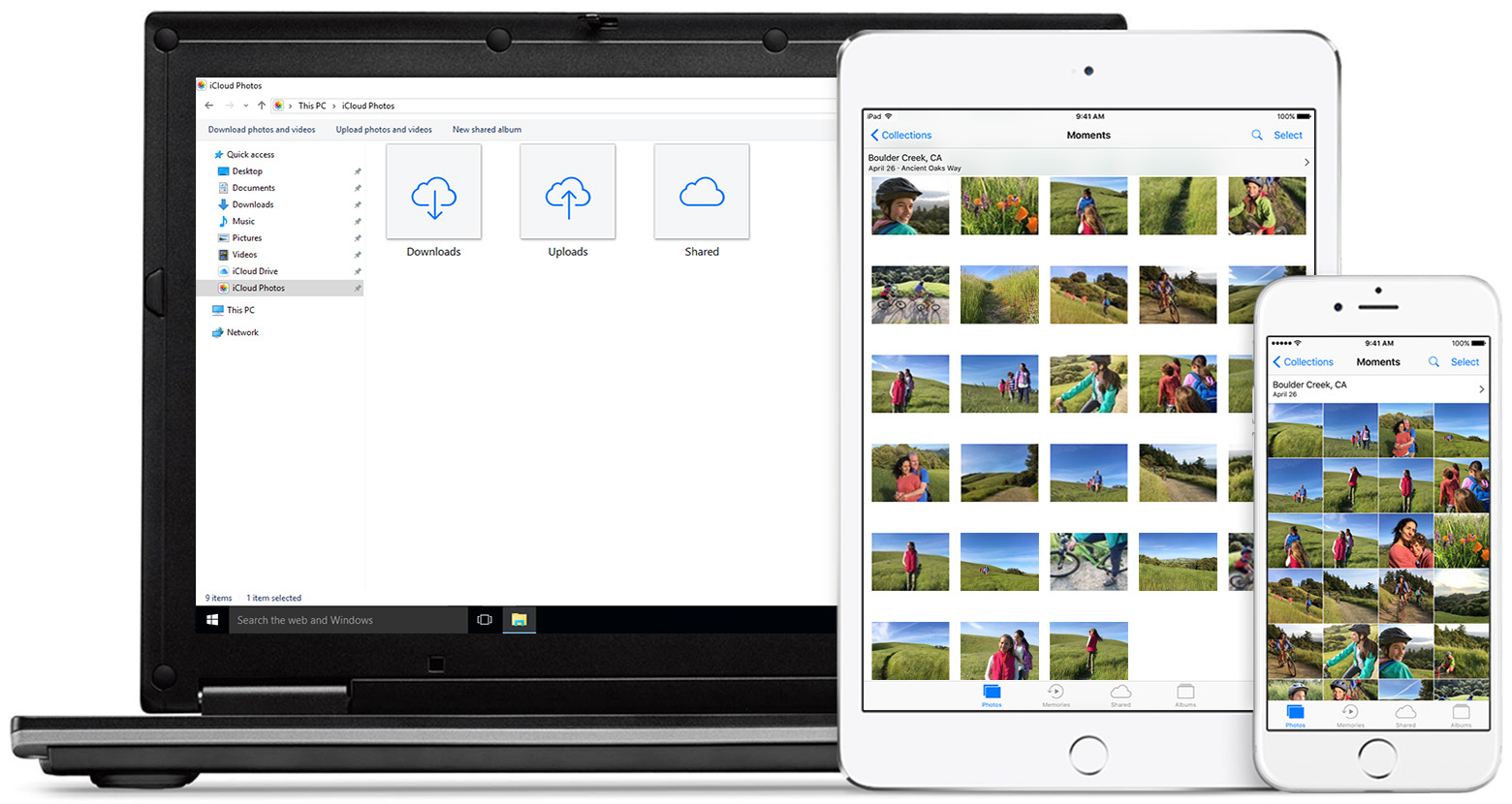
iCloud Photo Library safely stores all your photos and videos in iCloud, so they're available on all your devices.

iCloud Photo Library uploads new photos and videos from your Windows PC so you can view them in the Photos app on your iPhone, iPad, iPod touch, and Mac, and on iCloud.com. New photos you take automatically download from iCloud Photo Library and you can choose to download your entire collection by year.

Here's what you need

Before you get started, you need to sign in to iCloud with your Apple ID. Just follow the set up instructions for your iPhone, iPad, or iPod touch or Mac. Then follow these steps to turn on iCloud Photo Library on your PC with Windows 7 or later.

Learn more about iCloud system requirements.


Turn on iCloud Photo Library

  1. Download iCloud for Windows.
  2. Open iCloud for Windows.
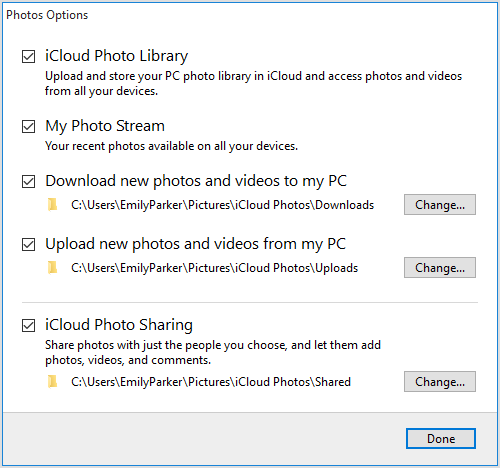
  3. Next to Photos, click Options.
  4. Select iCloud Photo Library.
  5. Click Done, then click Apply.
  6. Turn on iCloud Photo Library on all of your Apple devices.

You can also choose to use My Photo Stream and iCloud Photo Sharing, and customize the location of your upload and download folders.

When you turn on iCloud Photo Library on your PC, My Photo Stream is turned off automatically. If you want to send new photos to your devices that don't use iCloud Photo Library, you can turn My Photo Stream back on.

Upload your photos and videos to iCloud Photo Library

You can upload your photos and videos from your PC to iCloud Photo Library when you follow these steps:

  1. Open a File Explorer window.
  2. Under Favorites, click iCloud Photos.
  3. Click Upload photos and videos.
  4. Choose the photos and videos you want to upload and click Open.

You can also drag and drop photos and videos from your PC into the Uploads folder in iCloud Photos. You can view the photos and videos you uploaded in the Photos app on iCloud.com and on all your Apple devices.

Download your photos and videos from iCloud Photo Library

New photos and videos you add to iCloud Photo Library will automatically download to your PC. You can also download your collection by year when you follow these steps:

  1. Open a File Explorer window.
  2. Under Favorites, click iCloud Photos.
  3. Click Download photos and videos.
  4. Choose the photos and videos you want to download and click Download.

Your photos and videos download to the location you set in iCloud Photos Options.

Learn more

If you need help managing and using iCloud Photo Library with your Windows PC, you can learn more.


Elyssa Durant